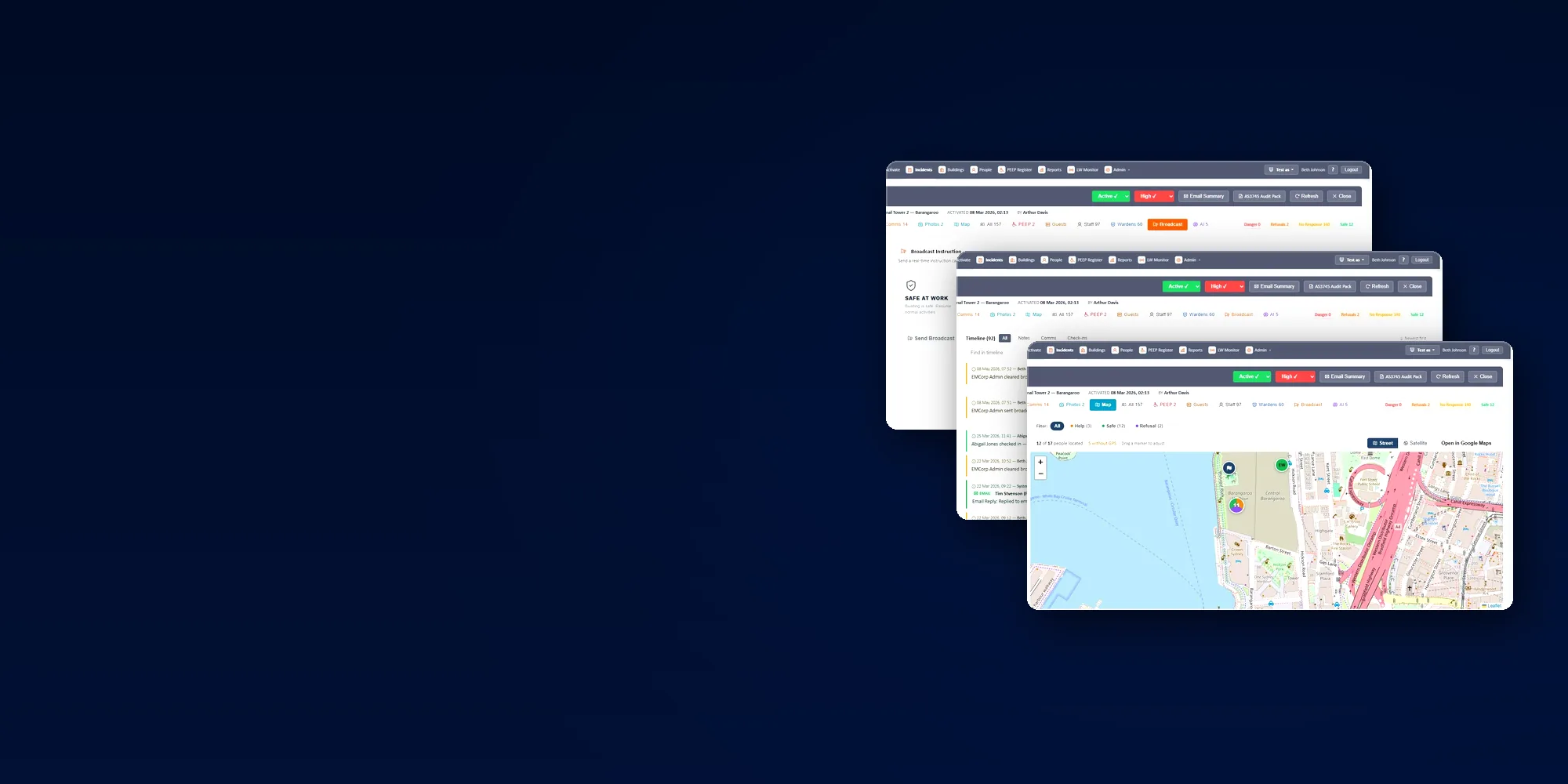
Three overlapping EMAction screens — broadcast instruction cards, the incident timeline and the live incident map

The complete feature reference.

Every capability in EMAction, split the way it is licensed — the base platform first, then the Warden & Evacuation Response addon that most clients run on top of it.

Base platform
Warden & Evacuation Response addon
AI & foundations

Available on every deployment

The incident record and everything built on it. These capabilities are present whether or not any addon is enabled — including on a Lone-Worker-only deployment, where escalations still create real incidents with a full timeline, map, comms and report.

QR-code incident reporting

Public QR codes posted throughout the facility let anyone — including visitors — report an incident without logging in. SMS OTP verification confirms identity before submission.

  • Public QR codes posted throughout the facility.
  • Anyone — including visitors — can report an incident without logging in.
  • SMS OTP verification confirms identity before submission.
  • Registered warden/staff reports create incidents immediately.
  • Unregistered reports are saved as drafts flagged for duty warden review.

Two-way SMS and comms

Twilio-backed SMS handles mass notifications and targeted messages. Inbound replies are logged to the incident timeline automatically.

  • Twilio-backed SMS for mass notifications and targeted messages.
  • Inbound replies automatically logged to the incident timeline.
  • Chat, SMS and email channels against a single incident, with sender identity and timestamp on every message.

Per-warden message channels, notification templates and one-tap broadcast to all staff in a building are part of the Warden & Evacuation Response addon.
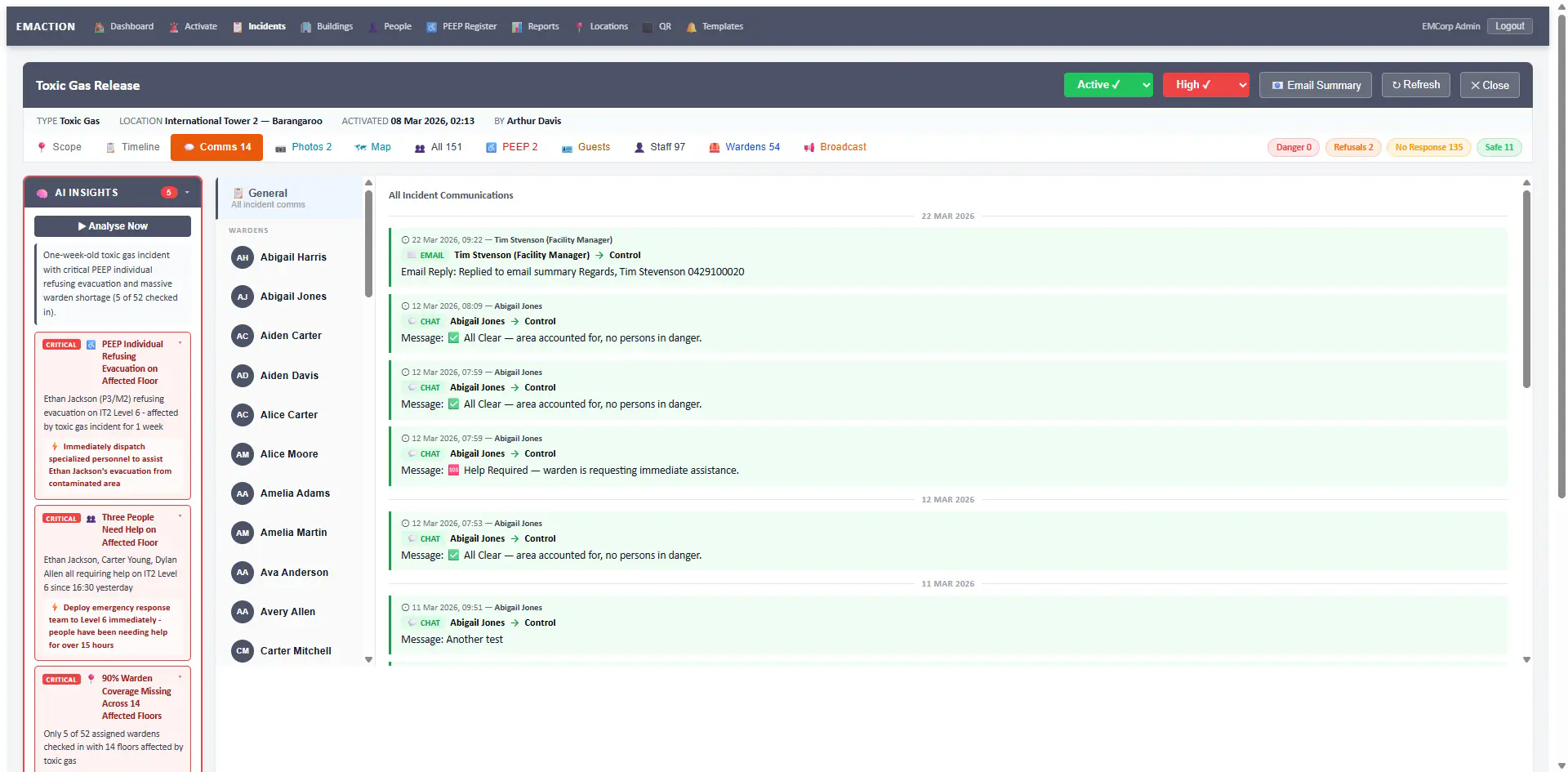
EMAction two-way SMS and in-app chat panel with Warden messages
Two-way SMS — outbound broadcasts and inbound replies logged to the timeline.

Live incident map

Leaflet-based live map with clustered markers, street and satellite views. GPS-enabled occupants plot themselves in real time; wardens place everyone else with draggable pins.
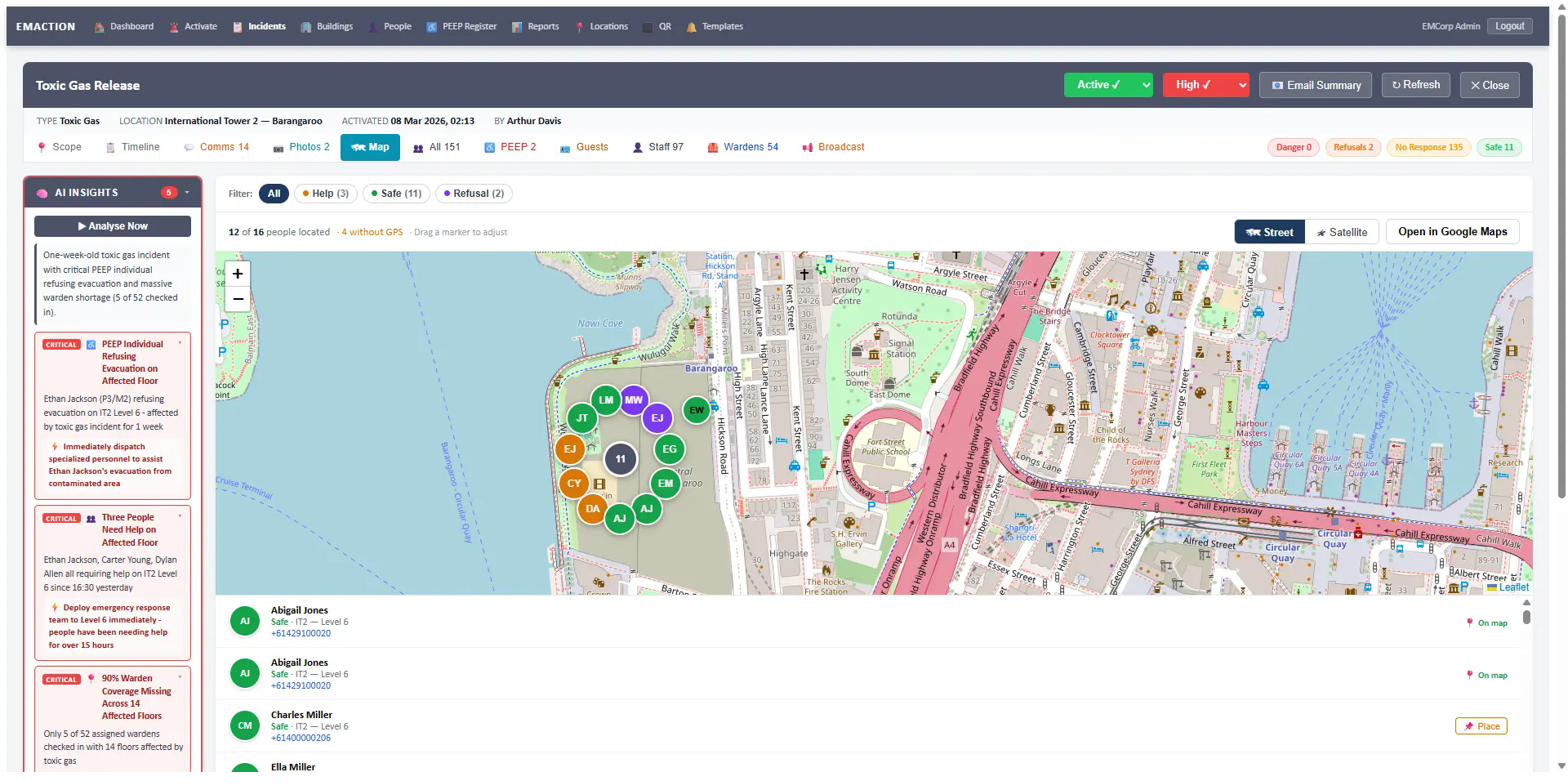
  • Leaflet-based live map with clustered markers.
  • Street and satellite views.
  • GPS-enabled occupants shown in real time; draggable pins for manual placement.
  • PEEP individuals, help requests, and refusals visually distinguished.
  • Open-in-Google-Maps link for emergency services handoff.
EMAction live incident map with clustered markers and GPS occupant pins
Live incident map — GPS occupants, draggable pins, PEEP/help/refusal markers.

Photo and video capture

Wardens and staff upload photos and video directly during an incident. Every media item attaches to the incident timeline with uploader, timestamp and caption.
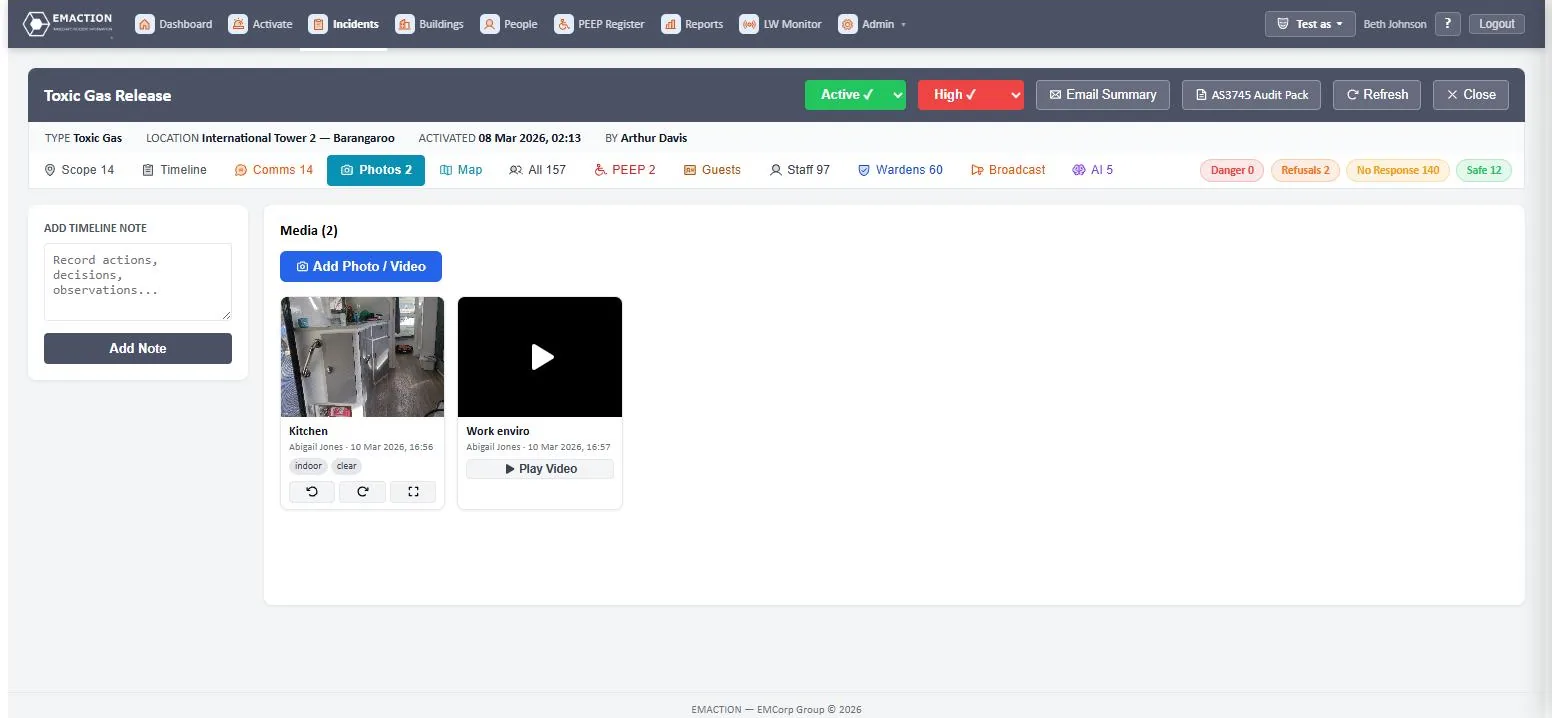
  • Warden and staff photo/video uploads during an incident.
  • Attached directly to the incident timeline with uploader, timestamp and caption.
  • Used by Control for situational awareness and post-incident review.
EMAction photo and video uploads attached to an incident timeline
Photo and video capture — tagged with uploader, timestamp and caption.

Incident timeline & audit trail

The incident timeline is EMAction’s tamper-resistant chronological record. Every activity on the incident — check-ins, notes, photos, SMS in and out, broadcasts, status changes and AI insights — is recorded with the actor’s identity and timestamp. Default sort is newest first, and the timeline is chronologically aware across incidents that span multiple days.

  • Tamper-resistant chronological audit trail.
  • Records: check-ins, notes, photos, SMS in/out, broadcasts, status changes, AI insights.
  • Default sort: newest first. Chronologically aware for incidents spanning multiple days.
  • Entry formats:
    • Check-in — [DD MMM YYYY, HH:MM] — [Person making entry] / [Person checked in] checked in — [status] at [location]
    • Note — [DD MMM YYYY, HH:MM] — [Person making entry] / Note: […]
    • Photo — [DD MMM YYYY, HH:MM] — [Person making entry] / Photo Uploaded: [title]
    • SMS — [DD MMM YYYY, HH:MM] — [Sender] / Control → [User] or [User] → Control
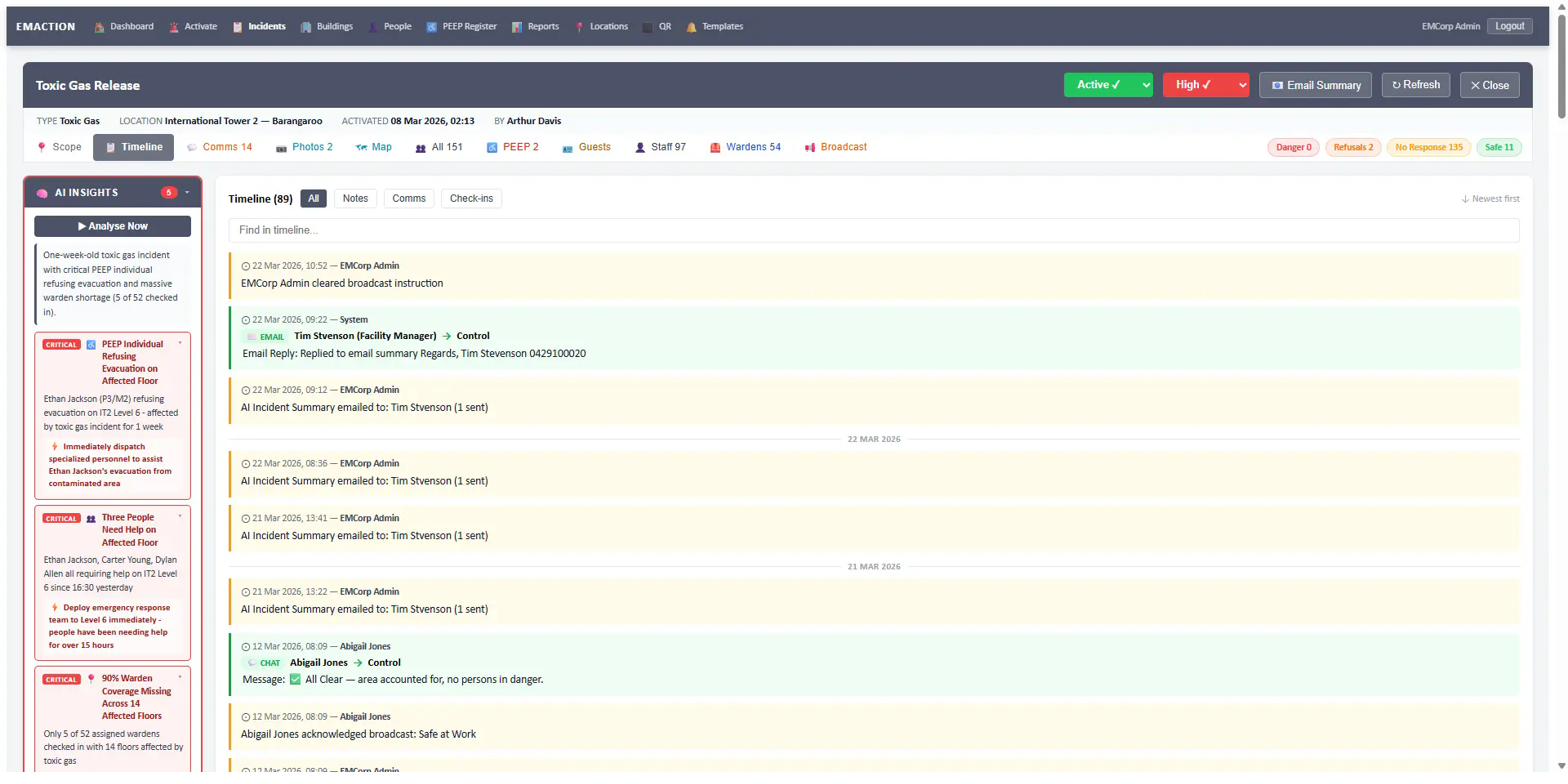
EMAction tamper-resistant incident timeline with chronological entries
Tamper-resistant incident timeline — every action recorded with actor and timestamp.

Stakeholder management

Per-building stakeholder lists scope who receives incident summaries. Stakeholders are assigned to specific locations within a building and receive AI-drafted summary emails automatically.

  • Per-building stakeholder list: Building Managers, Fire Safety Advisors, Facility Managers, owners.
  • Stakeholders are scoped to specific locations within a building.
  • Receive AI-generated incident summary emails automatically.

Reporting and exports

Incident history, compliance exports, refusals reports and occupancy statistics — every report the compliance framework expects is exportable.

  • Incident history with date-range filters.
  • Compliance export — check-in rates per incident.
  • Refusals report across all incidents.
  • Building occupancy statistics.
  • Individual incident report views with AI-generated summaries.
  • Email sharing of reports to stakeholders.

Multi-tenant architecture

Every client runs on its own subdomain with isolated data, storage and sessions. Tenant-level feature flags turn optional modules on or off per client.

  • Every client on their own subdomain (e.g. acmecorp.emaction.io).
  • Isolated database, storage and sessions per tenant.
  • Tenant-level feature flags for optional modules.
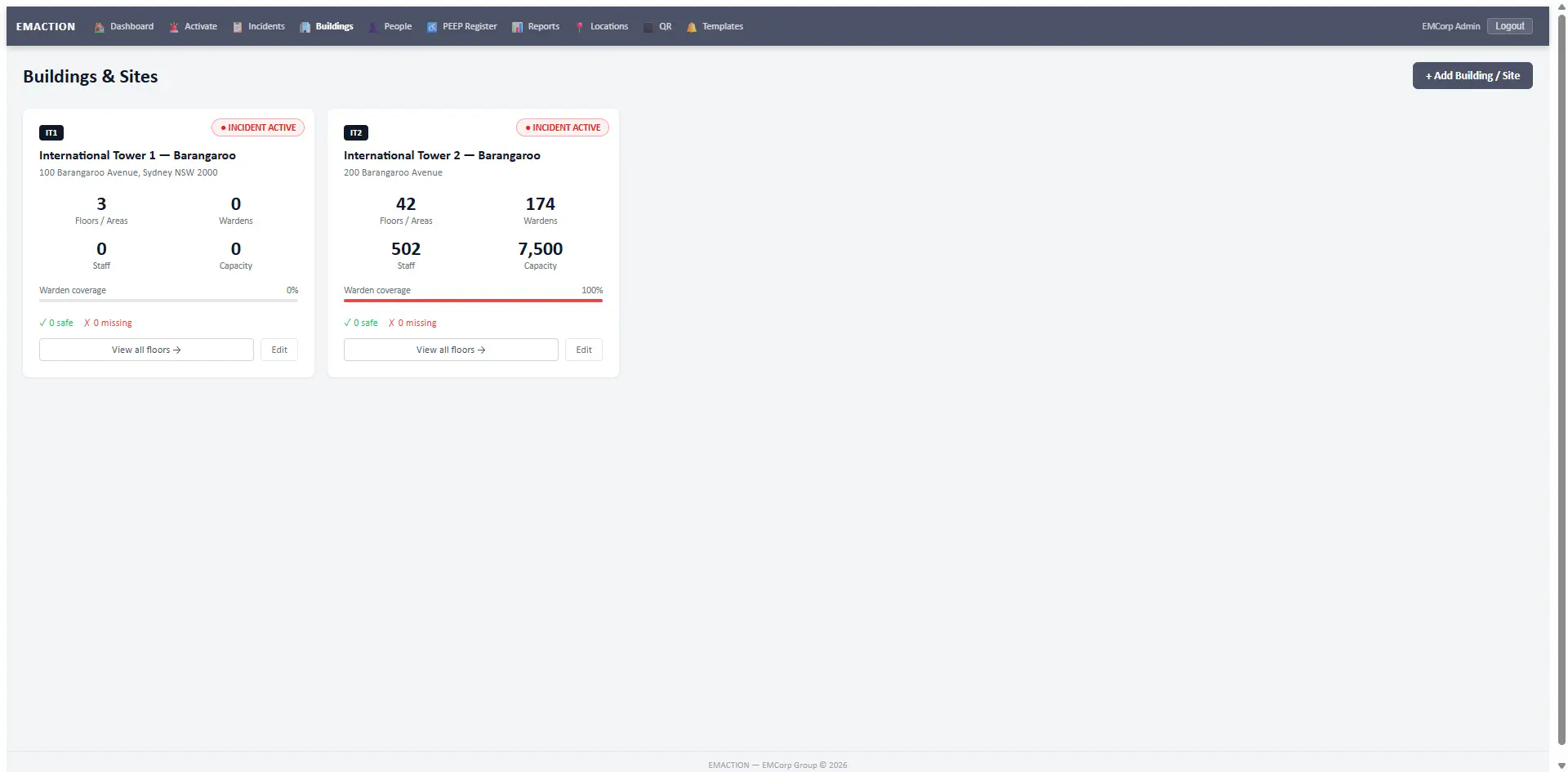
EMAction buildings dashboard showing multi-property tenant overview
Multi-tenant buildings dashboard — each client isolated on their own subdomain.
Addon — on by default

Warden & Evacuation Response

Building evacuation response — the muster, accountability and warden-communication stack, aligned to AS 3745 and AS 4083. Enabled by default on new deployments and switched off only for clients with no building to evacuate. Addon overview →

Incident activation

Activate an incident in under 30 seconds from any device. Category, type and severity are chosen in a single form; notification fires automatically to every Warden and staff member assigned to the affected locations.

  • Activate an incident in under 30 seconds from any device.
  • Category and type picker: Fire, Hazmat, Security, Medical, Natural Hazard, Infrastructure, External, Other.
  • Severity levels: Low, Medium, High, Critical.
  • Title and optional notes.
  • Automatic notification of wardens and staff in affected locations.

Manual activation is part of this addon. Incidents raised automatically by a Lone Worker escalation are created without it.
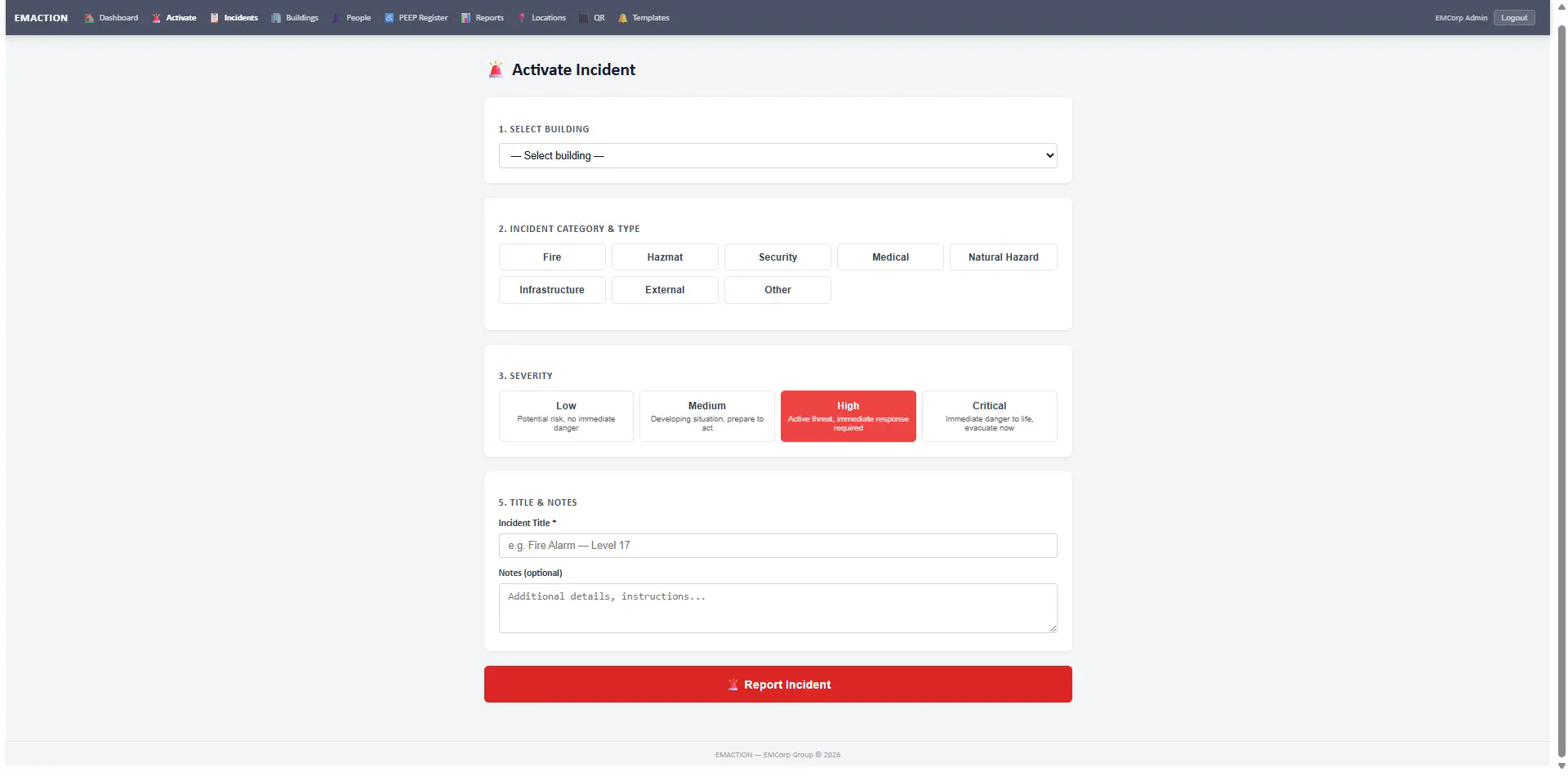
EMAction incident activation form with category, type and severity pickers
Incident activation — category, type, severity and location in one form.

Check-ins and status

Four statuses drive every check-in: Safe, En Route, Need Help, Danger. Occupants check in via the QR code at their assembly point or through a portal fallback on any device with a browser.

  • Four statuses: Safe, En Route, Need Help, Danger.
  • QR code at every assembly point and floor exit pre-fills the check-in form.
  • Portal check-in fallback for any device with a browser.
  • Manual warden check-in on behalf of occupants.
  • Emergency contact SMS alert fires automatically on Need Help / Danger.

Structured location input — the location picker is ordered to cut taps under pressure:

  • Location dropdown ordered: Assembly Point → warden’s default locations → “Other”.
  • “Other” reveals a free-text input for locations not in the list.
  • Warden check-ins pre-select the warden’s default location.

Warden management (AS 3745 aligned)

The warden structure maps directly to AS 3745 — Floor/Area Warden, Chief Warden, Incident Controller. Scoping is enforced at the database query layer; wardens only see incidents affecting their assigned locations.

  • Warden roles: Floor/Area Warden, Chief Warden, Incident Controller.
  • Warden scoping enforced at the query layer — wardens only see incidents affecting their assigned locations.
  • Warden Quick Response panel — large, phone-friendly buttons: IN POSITION, ALL CLEAR, LAST TO LEAVE, NEED HELP.
  • Wardens do not send broadcast messages. They communicate with the Control Room only.
  • Warden assignment across buildings and people, with coverage indicators.

With the addon off, the Floor/Area Warden and Chief Warden roles are not offered.

Broadcast instructions

Instruction cards are pushed to every connected warden screen in real time over WebSocket — no SMS queue, no delayed delivery. The Chief Warden or Incident Controller selects the card; every Warden sees it instantly and taps Acknowledge to confirm receipt.
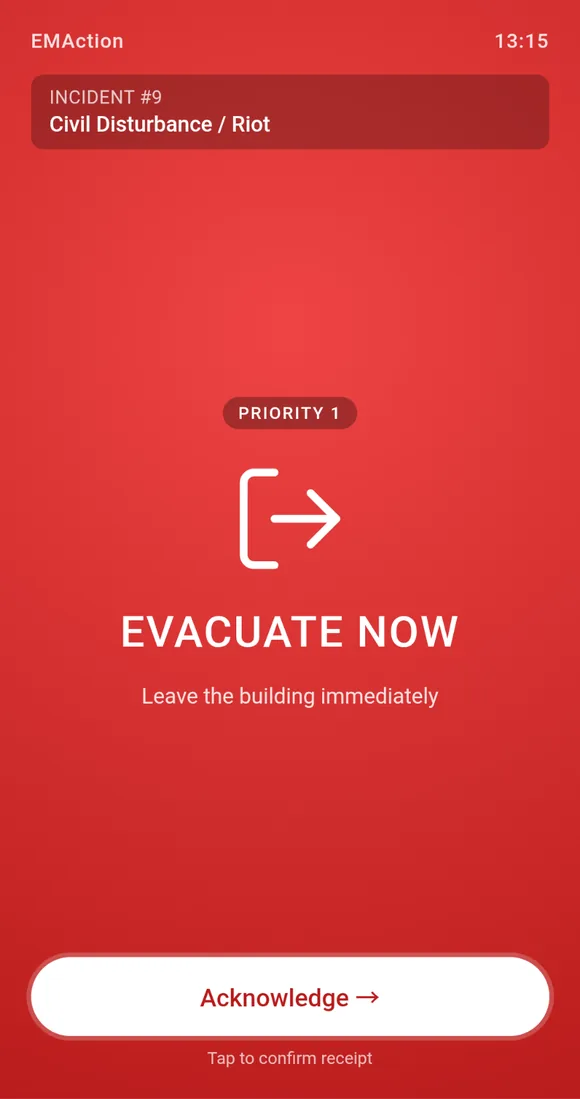
  • Real-time instruction cards pushed to all connected warden screens. No SMS required — instant delivery via WebSocket.
  • Each card carries a colour, a priority badge, a clear directive and an Acknowledge tap that is logged to the incident timeline.
  • Active broadcast indicator shown on all warden dashboards.
  • Per-warden message channels, and broadcast to all staff in a building with one tap.
Evacuate Now broadcast card on a warden phone screen, with a Priority 1 badge and an Acknowledge button

Evacuate Now

Immediate evacuation. Wardens direct every occupant to leave for the assembly point. Used once it is safer outside than where people currently are.
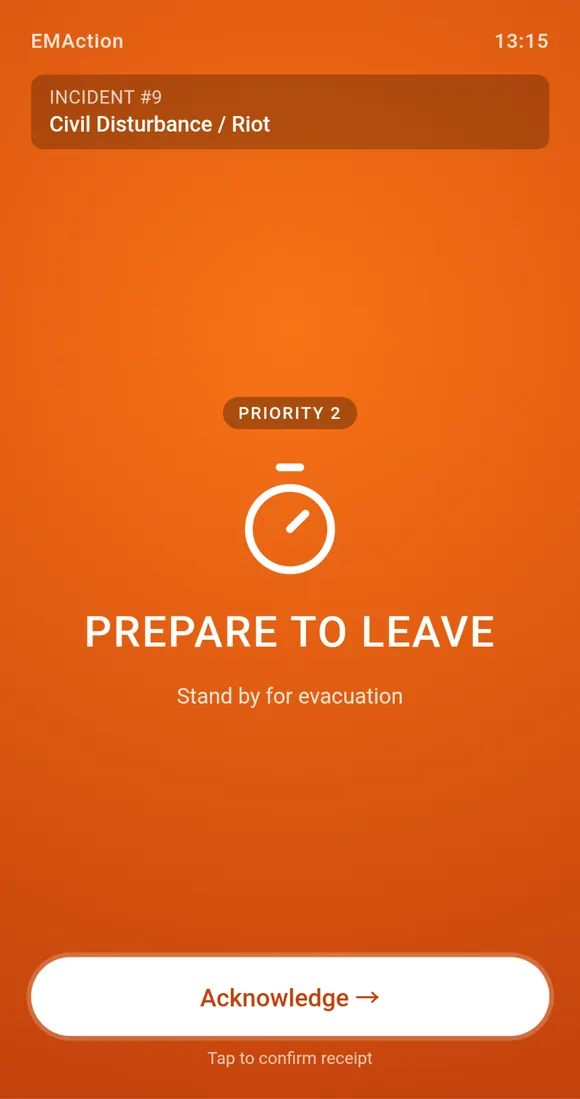
Prepare to Leave broadcast card on a warden phone screen, with a Priority 2 badge and an Acknowledge button

Prepare to Leave

Stand-by directive. Wardens ready their floor or wing — PEEP-priority occupants first — while the Chief Warden decides whether to escalate to Evacuate Now.
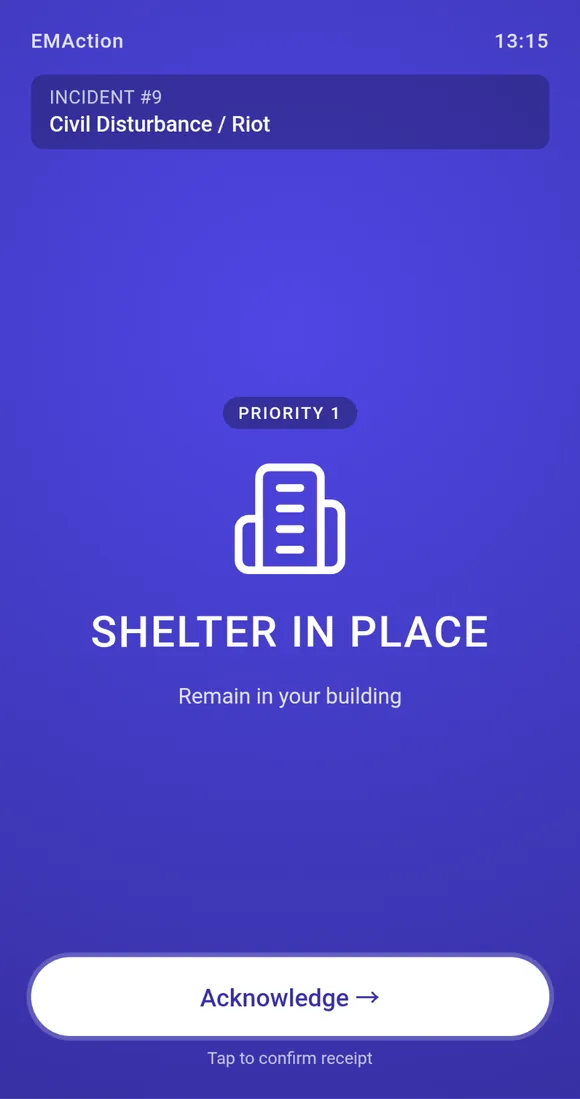
Shelter in Place broadcast card on a warden phone screen, with a Priority 1 badge and an Acknowledge button

Shelter in Place

Stay where you are, close doors and windows. Used when the external environment — smoke plume, severe weather, civil incident — is more hazardous than the building.
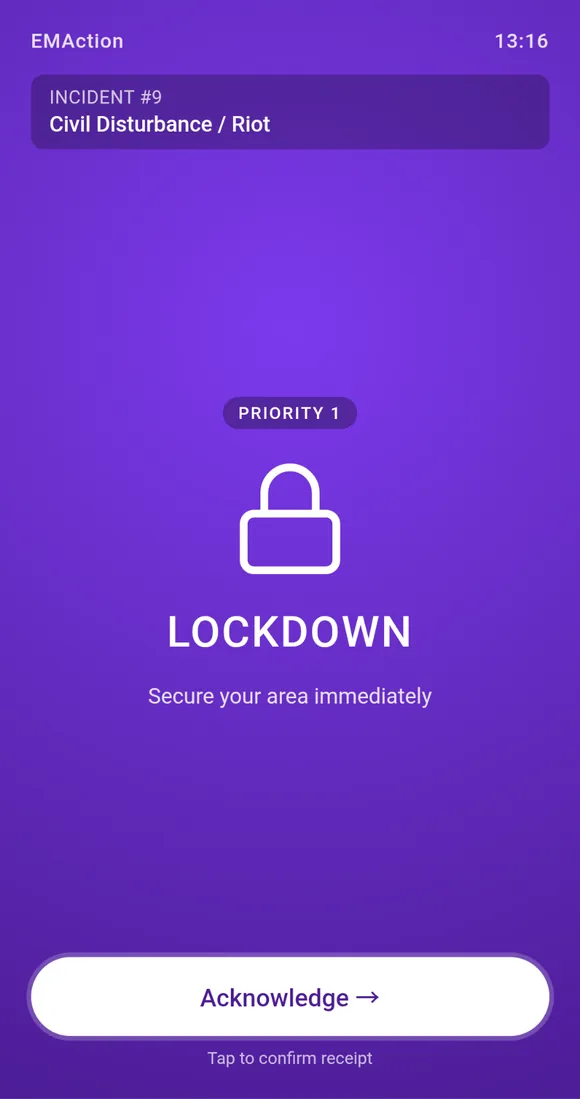
Lockdown broadcast card on a warden phone screen, with a Priority 1 badge and an Acknowledge button

Lockdown

Secure in place. Lock doors, move out of sight, silence devices. Used for an intruder, armed threat or external violence where movement would expose occupants.
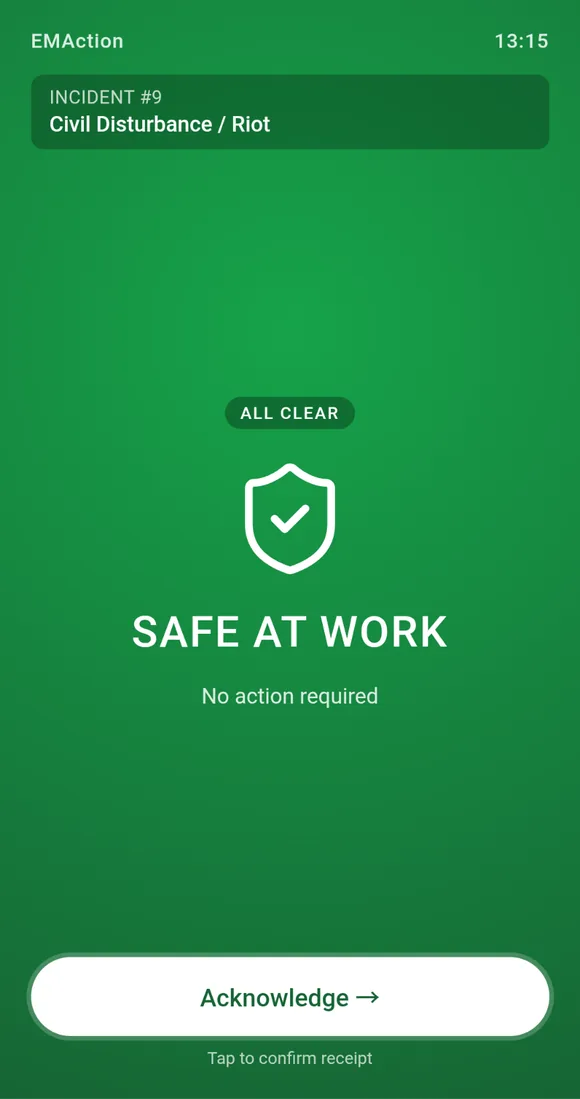
Safe at Work broadcast card on a warden phone screen, with an All Clear badge and an Acknowledge button

Safe at Work

All-clear. The threat has passed and normal activity can resume. Logged on the timeline so the resolution is on the record alongside the activation.
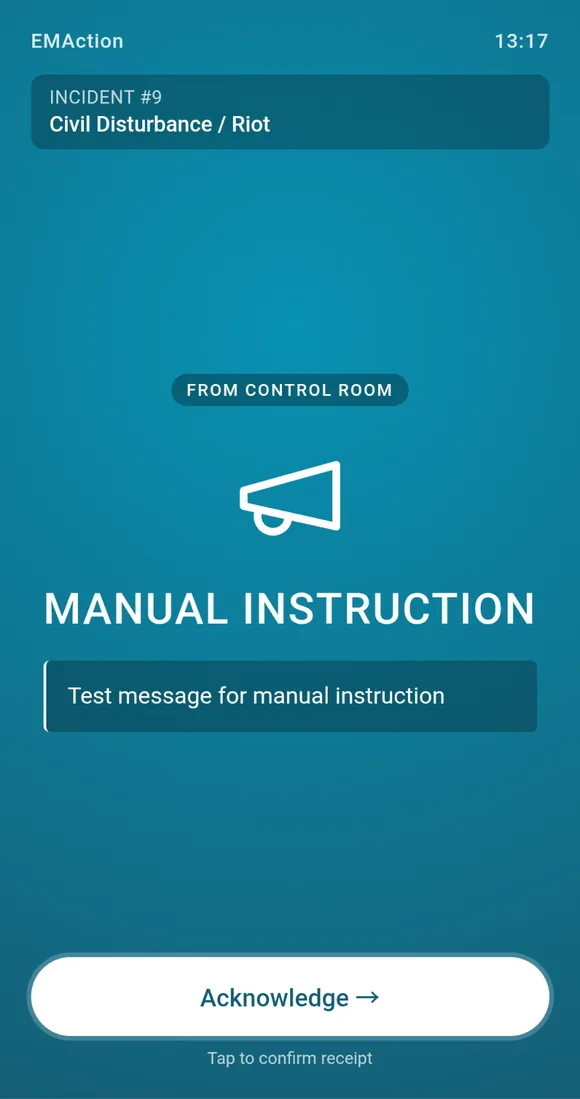
Manual Instruction broadcast card on a warden phone screen, with a From Control Room badge and an Acknowledge button

Manual Instruction

Free-text directive authored by the Chief Warden. For situations the pre-built cards don’t cover — staged evacuation, route changes, partial lockdown.

PEEP register

Personal Emergency Evacuation Plans, coded across four dimensions: priority, mobility, sensory/cognitive, medical/equipment. Filterable by building and classification, exportable to CSV, and visible on a dedicated PEEP tab during every incident.
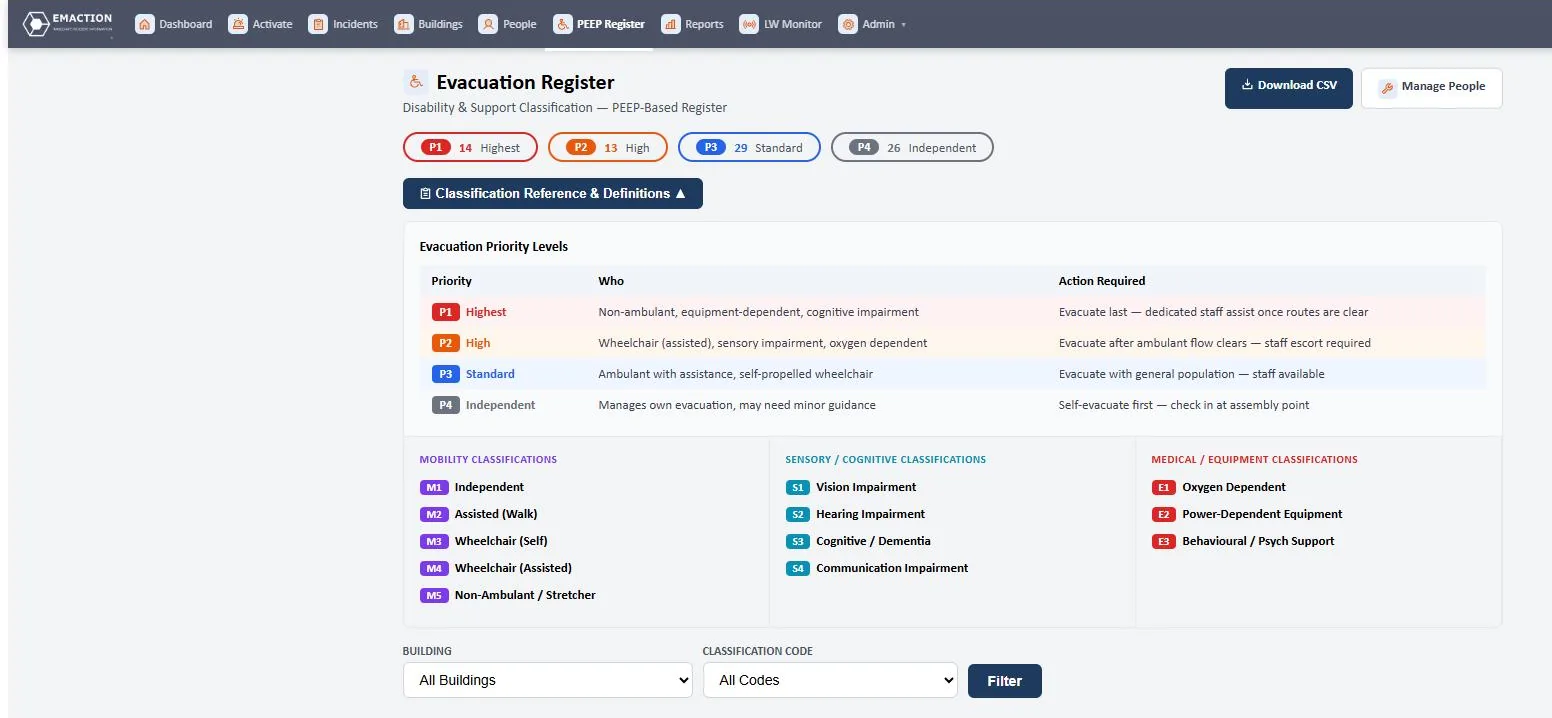
  • Priority classification: P1 Highest, P2 High, P3 Standard, P4 Independent.
  • Mobility codes: M1 Independent through M5 Non-Ambulant / Stretcher.
  • Sensory/cognitive codes: S1–S4 (vision, hearing, cognitive/dementia, communication).
  • Medical/equipment codes: E1 Oxygen Dependent, E2 Power-Dependent Equipment, E3 Behavioural/Psych Support.
  • Filterable by building and classification.
  • CSV export.
  • PEEP-on-file status (on file / pending) to track paperwork.
  • Visible during incidents on the dedicated PEEP tab with per-person status.
EMAction PEEP register classification reference — evacuation priority levels P1–P4 with mobility, sensory and medical codes
Evacuation register — priority bands, classification reference and the action required for each priority level.

Area status dashboard

At-a-glance per-location cards for every floor, wing, zone or area during an active incident.
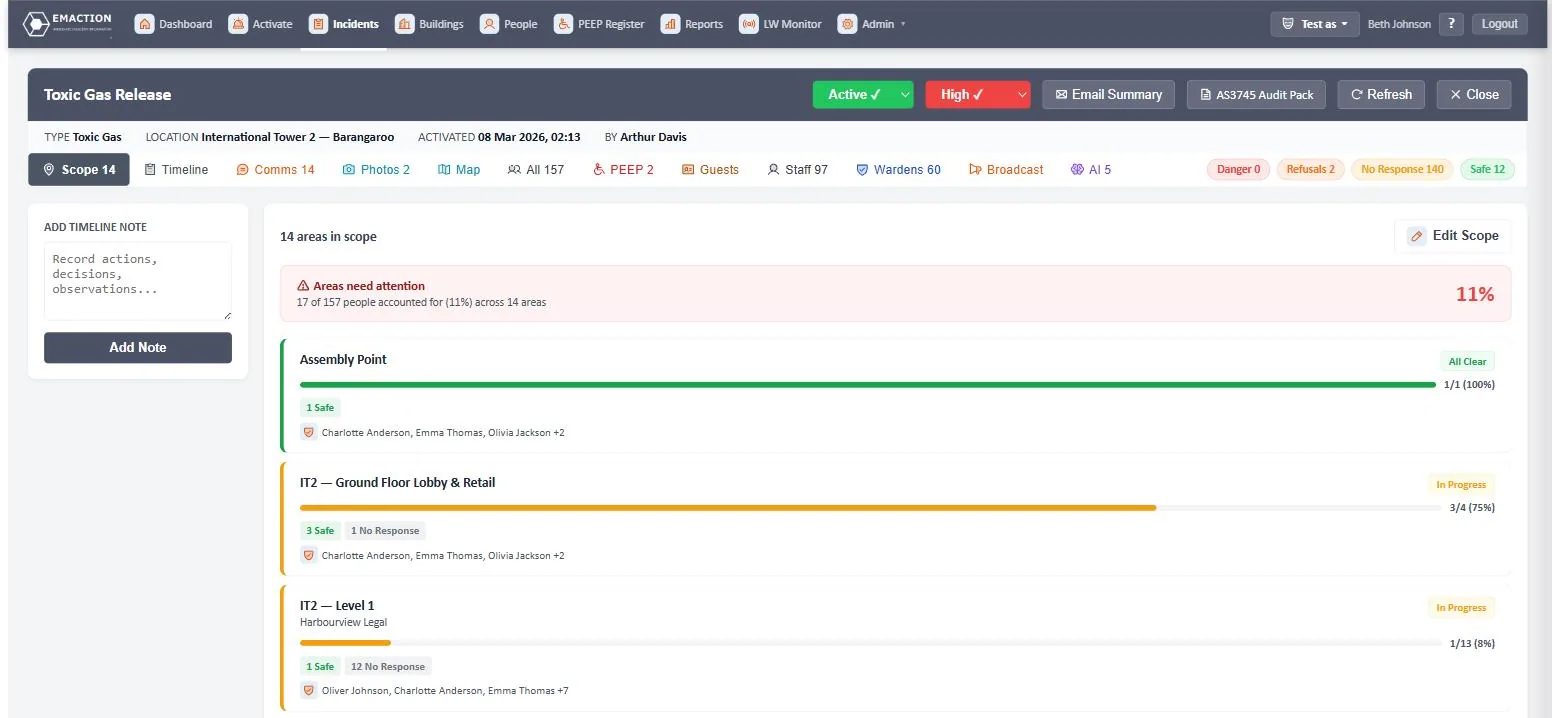
  • Per-location cards with progress bars, status pills, warden coverage indicators and PEEP counts.
  • At-a-glance view of every floor, wing, zone or area during an incident.
EMAction area status dashboard with per-location progress bars and warden coverage
Area status dashboard — one card per location, live during the incident.

Notification templates

Pre-written SMS and email templates managed centrally. One tap during an incident sends the right message to the right people.

  • Pre-written SMS and email templates.
  • Managed centrally under the Templates page.
  • One-tap send during an incident.

AI features

Advisory only. All AI features are advisory. They do not replace the authority of the Incident Controller or Chief Warden. Each feature degrades gracefully when the API is unavailable. A system-wide AI on/off toggle is available in settings.

Situational Awareness Assistant

On demand, the Control Room taps “Analyse Now” and EMAction reviews the incident feed — the last 50 timeline entries, check-in statistics, PEEP status, warden coverage gaps and the last 20 warden messages — then surfaces prioritised alerts the Control Room might miss.

  • Analyses the last 50 timeline entries, check-in statistics, PEEP status, warden coverage gaps and the last 20 warden messages.
  • Surfaces prioritised alerts the Control Room might miss.
  • Runs on demand via an “Analyse Now” button on the incident page.

Example output:

“PEEP Individual Refusing Evacuation on Affected Floor — Ethan Jackson (P3/M2) refusing evacuation on IT2 Level 6 — affected by toxic gas incident for 1 week. Immediately dispatch specialised personnel.”

Warden Message Interpretation

Parses incoming warden SMS and chat messages, auto-tags them by urgency and category, and surfaces suggested follow-up actions for Control Room review.

  • Parses incoming warden SMS and chat messages.
  • Auto-tags by urgency (low/medium/high/critical) and category (safety, headcount, hazard, request).
  • Surfaces suggested follow-up actions (e.g. “expand incident scope to Level 15”, “consider severity increase”) for Control Room review.
  • Bridges the gap between plain-language warden reports and actionable Control Room intelligence.

Stakeholder Email Summary

AI-generated professional incident summaries, emailed to building stakeholders on demand during or after an incident.

  • AI-generated professional incident summaries emailed to building stakeholders (owners, facility managers, fire safety advisors).
  • Includes: subject line, executive overview, chronological timeline summary, people accountability summary, warden performance assessment, key observations, recommendations, current status.
  • Available on demand during or after an incident.

Smart Notification Drafting

AI drafts SMS and email notifications based on incident context. The Control Room reviews and edits every draft before sending — there is no auto-send.

  • AI drafts SMS (≤155 characters) and email notifications based on incident context.
  • Control Room reviews and edits before sending — no auto-send.
  • Uses the faster, cheaper model (Claude Haiku) for speed.

Model routing

Two Claude models, routed by task: Sonnet for deep reasoning, Haiku for speed.

  • Claude Sonnet for complex reasoning — situational awareness, email summaries.
  • Claude Haiku for fast tasks — message tagging, notification drafts.

Platform foundations

The shared substrate every feature above runs on — security, time, compliance posture and roles.

Security and access

  • OTP login for all roles with role-based redirects. Email/password fallback.
  • 12-hour absolute session timeout.
  • QR check-in pages gate incident data behind authentication.
  • Tenant data is isolated — no cross-tenant access possible.
  • Client data (uploads, database, sessions) is never overwritten by deployments.

Timezone handling

  • All dates stored in UTC. Displayed in the building’s configured timezone.
  • Per-building timezone setting.

Compliance posture

  • Built to support AS 3745 (Planning for emergencies in facilities), aligned with AS 4083 (Planning for emergencies — Health care facilities), and WHS legislation.
  • Incident types cover all categories required by the standards: Fire, Hazmat, Security, Medical, Natural Hazards, Infrastructure, External, plus industry-specific codes (healthcare colour codes, education lockdown/lockout, industrial confined space).
  • Response actions: Evacuate, Partial Evacuation, Shelter-in-Place (with level variants), Lockdown, Lockout, Standby, All Clear.

AS 3745 and AS 4083 support is delivered through the Warden & Evacuation Response addon — wardens, musters, check-ins, PEEP and the response actions all live there. The WHS audit-trail obligations are met by the base platform on its own.

Roles

Every role has a defined scope. Wardens only see incidents in their assigned locations; the Chief Warden sees the whole building; the Incident Controller sees all buildings under their remit. The warden roles come with the Warden & Evacuation Response addon — with it switched off, they are not offered.

RoleScopeTier
Staff / OccupantCheck in during evacuations; view own check-in history.Base; check-in requires Warden addon
Floor/Area WardenView incidents for assigned locations; manual check-ins; photos; SMS/chat with Control.Warden addon
Chief WardenAll warden capabilities plus: activate/resolve incidents; manage locations; mass SMS; view all check-ins.Warden addon
Incident ControllerAll Chief Warden capabilities plus: manage buildings.Base
EMCorp AdminFull access including user-building assignment and system-wide reports.Base

Ready to see it running?

Book a walkthrough on your own buildings, warden structure and compliance obligations — not a generic demo.

Request a demo